Differentiation
This section explains the use of automatic differentiation to compute derivatives of arbitrary computation.
Introduction
Before delving into the Python interface, let us first review relevant mathematical principles of derivative computation.
Consider a program that consumes certain inputs \(x_1\), \(x_2\), etc., performs a computation, and then generates outputs \(y_1\), \(y_2\), etc. Systems for automatic differentiation (AD) automate the computation of derivatives \(\partial y_i/\partial x_i\), which is instrumental when the program should be optimized to accomplish a certain task.
AD does this by decomposing the program into a sequence of steps that are individually easy to differentiate. Given such a decomposition, it then applies the chain rule to stitch the per-step derivatives into derivatives of the larger program.
For simplicity, let’s assume that the computation is pure, i.e., that it consistently produces the same output if re-run with the same input. In this case, we can think of the program as a function \(f:\mathbb{R}^m\to\mathbb{R}^n\) with an associated Jacobian matrix
If \(f\) has many inputs and outputs (e.g., with \(m\) and \(n\) on the order of a few millions), its Jacobian matrix with shape \(m\times n\) is incredibly large, making it too costly to store or compute.
A surprising insight of automatic derivative computation is that although \(J_f\) is often impossibly expensive to use on its own, one can cheaply compute matrix-vector products with \(\mathbf{J}_f\) on the fly. The cost of this is dramatically lower than the naive strategy of first computing \(\mathbf{J}_f\) and then doing the matrix-vector multiplication with the stored matrix. The key feature of AD systems is that they can automatically implement these kinds of matrix-vector products for a given algorithm \(f\).
Two kinds of products are mainly of interest: the forward mode right-multiplies \(\mathbf{J}_f\) with an arbitrary \(n\)-dimensional vector \(\boldsymbol{\delta}_\mathbf{x}\):
The result \(\boldsymbol{\delta}_\mathbf{y}\) provides a first-order approximation of the change in \(f(\mathbf{x})\) when shifting the evaluation point \(\mathbf{x}\) into direction \(\boldsymbol{\delta}_\mathbf{x}\) (in other words, a directional derivative).
Forward mode is great whenever we need to compute many output derivatives with respect to a single input \(x_j\). In this case, we would simply set \(\boldsymbol{\delta}_\mathbf{x}=(0, \ldots, 1, \ldots, 0)\) with a \(1\) in the \(j\)-th component so that the expression in Equation (1) extracts the \(j\)-th column of \(J_{\!f}\). Setting \(\boldsymbol{\delta}_\mathbf{x}\) to other values can be used to cheaply evaluate arbitrary linear combinations of the columns of \(\mathbf{J}_f\). Extracting multiple columns requires multiple independent passes with a proportional increase in computation time, which is why forward mode isn’t a good choice when a function should be separately differentiated with respect to many inputs.
Reverse, or backward mode instead goes the other way around and is often more appropriate in the case just mentioned. It right-multiplies the transpose Jacobian \(\mathbf{J}_f^T\) with an arbitrary \(m\)-dimensional output perturbation \(\boldsymbol{\delta}_\mathbf{y}\):
With a suitable choice of \(\boldsymbol{\delta}_\mathbf{y}\), this expression can extract a row or compute more general linear combinations of the rows of \(\mathbf{J}_f\).
(Note that \(\boldsymbol{\delta}_\mathbf{x}\) and \(\boldsymbol{\delta}_\mathbf{y}\) should be considered different symbols in Equations (1) and (2). In other words, this is not a coupled system of equations).
Reverse mode is widely used to train neural networks in the area of machine learning, where it is known as backpropagation. In this case, the function \(f\) computes a single loss value from a large set of neural network parameters, and \(\mathbf{J}_f\) turns into a large row vector containing all parameter derivatives. Reverse mode efficiently computes all of these derivatives in a single pass.
Note
There is a somewhat common misconception about these two modes: reverse mode does not compute derivatives of the function’s inverse \(f^{-1}\). Similarly, forward and reverse derivatives are not mathematical inverses of each other. For example, they compute exactly the same value when \(f\) is scalar (i.e., \(m=n=1\)). Instead, the main difference between them is their efficiency in obtaining desired derivative values, which depends on the target application and shape of the underlying Jacobian (i.e., \(m\) and \(n\)).
Basics
Differentiable computation requires importing AD-enabled array types from a
dedicated set of namespaces (drjit.cuda.ad, drjit.llvm.ad,
and drjit.auto.ad). You should also include non-differentiable
integer types from there for consistency (e.g., drjit.auto.ad.UInt).
>>> # ❌ Lacks the ".ad" suffix
>>> from drjit.auto import Float, Array3f, UInt

>>> # ✅ AD-enabled array types
>>> from drjit.auto.ad import Float, Array3f, UInt
Tracking derivatives has a computational cost and is not always desired. You
therefore must use dr.enable_grad() to
explicitly mark every differentiable input of a computation:
>>> x = Float(10)
>>> dr.enable_grad(x)
To differentiate in forward mode, perform the computation of interest and
finally invoke dr.forward() on the original input.
Following this step, the gradient of the output variable(s) can be accessed via
their .grad member(s).
>>> y = x**2
>>> dr.forward(x)
>>> y.grad
[20]
Alternatively, dr.backward() computes reverse mode
derivatives of input variable(s) starting from an output.
>>> y = x**2
>>> dr.backward(y)
>>> x.grad
[20]
That’s it, for the most part. Differentiation composes with other features of Dr.Jit, such as memory operations (gathers/scatters), symbolic and evaluated control flow (loops, conditionals, indirect calls), textures, etc.
The next subsections review common mistakes and pitfalls followed by a discussion of advanced uses of automatic differentiation.
Pitfalls
The following points sometimes cause confusion:
Gradients of interior variables
Consider the forward derivative of a computation with the following dependency structure:
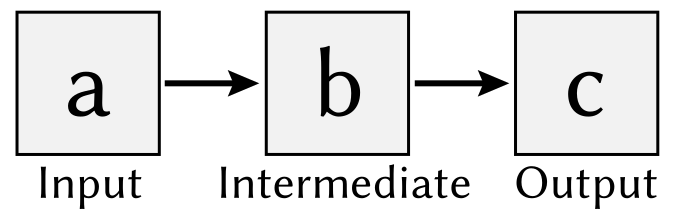
>>> a = Float(1)
>>> dr.enable_grad(a)
>>> b = a*2
>>> c = b*2
>>> dr.forward(a)
>>> c.grad
[4]
>>> b.grad
[0] # <-- 🤔
The gradient of c is correct, but why is b.grad zero?
AD operations like dr.forward() and
dr.backward() traverse a graph representation of the
underlying computation. This traversal is destructive by default: by
discarding processed nodes and edges, the system can eagerly release resources
that are no longer needed. Other widely used AD frameworks (e.g., PyTorch) do
this as well.
As a consequence, gradients are only stored in leaf variables, which refers
to variables that aren’t referenced by other computation (forward mode), or
variables that were made differentiable via drjit.enable_grad()
(reverse mode).
If you require derivatives of interior nodes, simply pass the flags= parameter
with a combination of elements from dr.ADFlag, e.g.,
dr.ADFlag.ClearNone:
>>> a = Float(1)
>>> dr.enable_grad(a)
>>> b = a*2
>>> c = b*2
>>> dr.forward(a, flags=dr.ADFlag.ClearNone)
>>> b.grad
[4]
>>> c.grad
[2] # <-- 😊
Alternatively, you could use an operation like drjit.copy()
to create a new (leaf) variable that copies the gradient from y.
Mutation of inputs
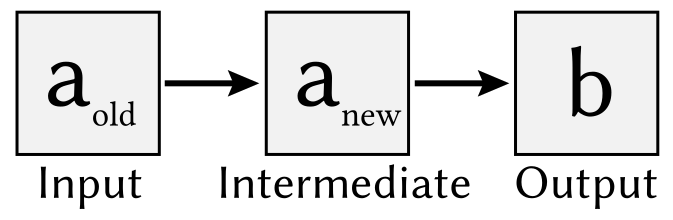
A related situation occurs when mutating inputs of a calculation differentiated using reverse mode.
>>> a = Float(1)
>>> dr.enable_grad(x)
>>> a *= a*2  # <-- in-place mutation
>>> b = b*2
>>> dr.backward(b)
>>> x.grad
[0]
In this case, the *= mutation changed the identity of the a variable,
which now points to an interior node of the computation graph. You must either
keep a reference to the original variable and query the gradient there, or ask
dr.backward() to perform a non-destructive AD traversal
(in this case, you will get the gradient of the intermediate variable,
which may not be desired).
Discussion
The following properties and limitations of Dr.Jit’s automatic differentiation feature are noteworthy:
Tracing: Dr.Jit embraces the concept of tracing computation for later execution, and this extends to AD as well: operations like
dr.backward()compute derivatives by appending further steps to the traced program. Although Dr.Jit’s AD layer internally uses a Wengert tape, the combination with tracing and ability to differentiate control flow symbolically causes it to be closer to code generation-based AD systems. Evaluating a differentiable computation usingdr.eval()inserts an AD checkpoint.Forward mode: Differentiation in Dr.Jit always follows the pattern below:
Marking inputs as differentiable
Performing a computation
Traversing the resulting AD graph to obtain derivatives
This sequence of steps is a good fit for reverse-mode AD but can be suboptimal for forward-mode AD, where steps 2 and 3 could in principle be combined. The current design is motivated by the desire to unify forward and reverse modes as much as possible, while optimizing backward propagation that is usually the key step in optimization tasks.
Higher-order derivatives: While Dr.Jit can compute first-order derivatives in forward and backward modes, it lacks support for higher-order differentiation, such as Hessian-vector products. No work in this direction is currently planned. Note that approximate second-order derivatives can often be obtained using the Gauss-Newton \(J^T J\) approximation, which can be evaluated in Dr.Jit using paired forward/backward passes.
Visualizations
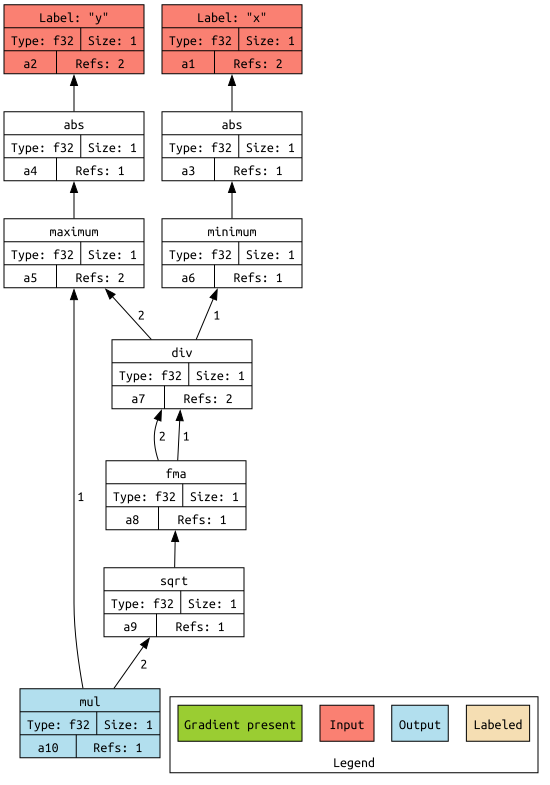
It is possible to visualize the AD computation graph via
dr.graphviz_ad() (this requires installing the
graphviz PyPI package).
Variables can be labeled to identify them more easily.
>>> x, y = Float(1), Float(2)
>>> dr.enable_grad(x, y)
>>> z = dr.hypot(x, y)
>>> x.label = "x"
>>> y.label = "y"
>>> dr.graphviz_ad()  # <-- Alternatively, dr.graphviz_ad().view() opens a separate window
In this case, this produces a graph that shows the computation graph of
dr.hypot().
Jacobian-vector products
The previous examples all computed derivatives with respect to a single variable, which is analogous to multiplying the associated Jacobian matrix with a vector of the form \(\boldsymbol{\delta}_\mathbf{x}=(0, \ldots, 1, \ldots, 0)\). As explained in the introduction, AD is also capable of computing more general Jacobian-vector products.
Here is an example:
>>> a, b = Float(1), Float(2)
>>> dr.enable_grad(a, b)
>>> a.grad = 10
>>> b.grad = 20
>>> x, y = ... # computation depending on 'a' and 'b'
>>> grad_x, grad_y = dr.forward_to(x, y)
The snippet assigns input gradients to variables a and b and indicates
that the system should propagate them to x and y in forward mode.
We could also start at the other end and propagate derivatives from a
and b to all other places. Similar options exist for reverse mode, which
produces four different types of AD traversals, which are illustrated on an
example graph below.
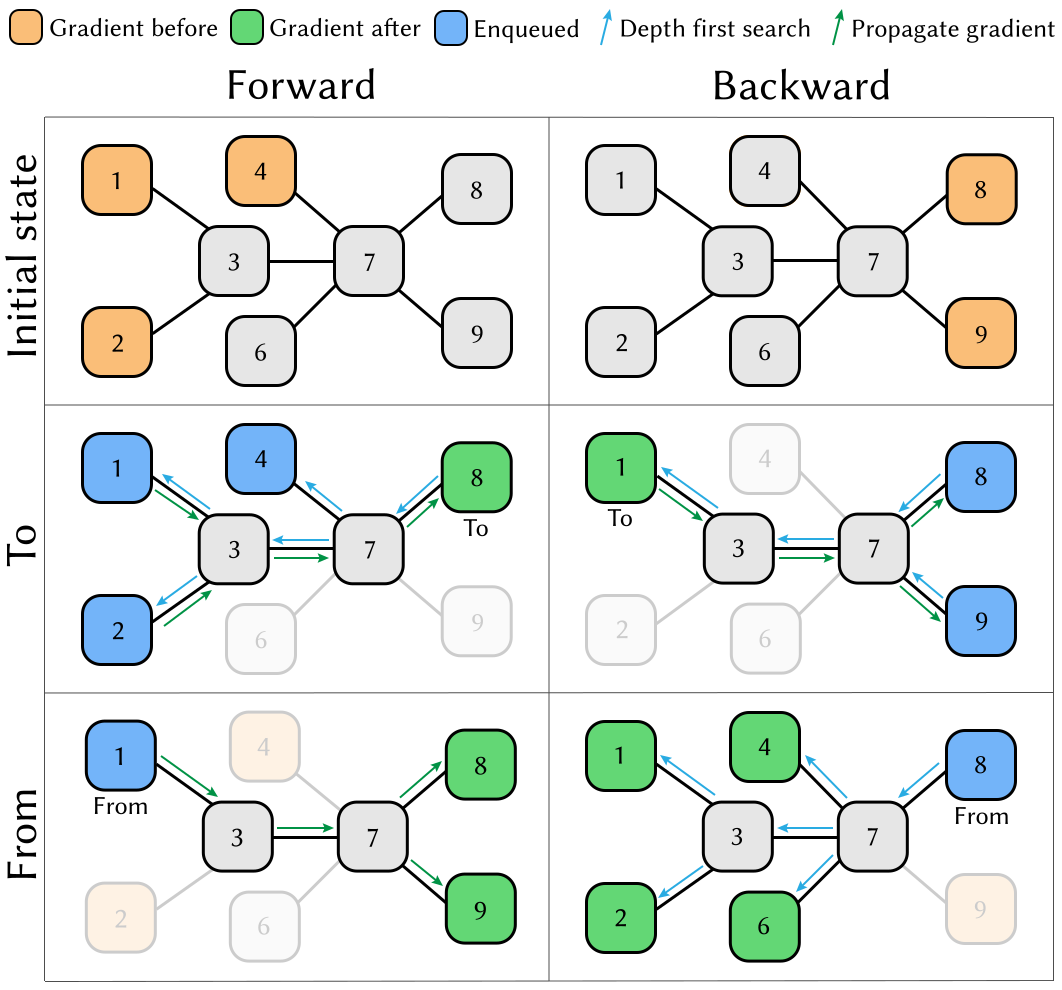
See dr.forward_to(), dr.backward_to(), dr.forward_from(),
dr.backward_from() for details. There is an even
lower-level interface (dr.enqueue() and
dr.traverse()) that can be useful in advanced use cases.
PyTrees
Functions in this section generally take multiple arguments and recurse through
PyTrees, which is convenient when differentiating many
variables at once. These variables can be organized in arbitrarily nested
tuples, lists, dictionaries. To access the gradient of such nested data
structure, use the dr.grad() function instead of the
.grad member, which only exists on Dr.Jit arrays.
Custom operations
Dr.Jit can compute derivatives of builtin operations in forward and reverse modes. Despite this, it may sometimes be useful or even necessary to tell Dr.Jit how a particular operation should be differentiated. Reasons for this may include:
The automatic differentiation backend cannot keep track of computation performed outside of Dr.Jit (e.g. using custom CUDA kernels). In this case, review the section on interoperability, since it presents a potentially simpler solution.
The derivative may admit a simplified analytic expression that is superior to what direct application of automatic differentiation would produce.
To introduce such custom differentiable operations, you must create a subclass
of dr.CustomOp containing several callback functions
that will be invoked when the AD backend traverses the associated node in the
computation graph. This class also provides a convenient way of stashing
temporary results during the original function evaluation that can be accessed
later on when evaluating the forward or reverse-mode derivative.
Suppose that we’re interested in computing the derivative of the following operation, which normalizes a 3D input vector:
Here is the first part of a custom operation that implements this expression:
class Normalize(dr.CustomOp):
    def name(self):
        # Name in computation graph visualizations
        return "normalize"

    def eval(self, value):
        self.value = value
        self.inv_norm = dr.rcp(dr.norm(value))
        return value * self.inv_norm

    # .. continued below
As mentioned above, the class must derive from dr.CustomOp and should have a member .name(self) to
identify the operation by name. Next, .eval(self, ...), performs an ordinary (non-differentiable) evaluation. In the
snippet above, this stores two temporary variables (m_input and
m_inv_norm) for later use in the derivative evaluation.
When the input \(\mathbf{v}\) of the normalization operation depends on an arbitrary parameter \(\theta\), its derivative is given by
The .forward(self) callback implements this derivative in forward mode.
The general pattern is to load input gradients, do some computation,
and then to assign the output gradient.
def forward(self):
    grad_in = self.grad_in('value')
    grad_out = grad_in * self.inv_norm
    grad_out -= self.value * (dr.dot(self.value, grad_out) *
                              dr.square(self.inv_norm))
    self.set_grad_out(grad_out)
The reverse-mode derivative .backward(self) turns this around. Here, it
looks essentially the same, but this is not the case in general.
def backward(self):
    grad_out = self.grad_out()
    grad_in = grad_out * self.inv_norm
    grad_in -= self.value * (dr.dot(self.value, grad_in) *
                             dr.square(self.inv_norm))
    self.set_grad_in('value', grad_in)
To use the custom operation, call it via dr.custom().
y = dr.custom(Normalize, x)
The interface supports passing arbitrary-length positional and keyword
arguments, PyTrees, etc. Please declare dr.CustomOp
subclasses once at the top level as opposed to within subroutines or
optimization loops, where repeated definition introduces overheads.
AD and Custom operations can be arbitrarily nested: in other words, it is legal
to recursively use AD within the .forward(self)
and .backward(self) callbacks.
Links to relevant methods:
Please review the following AD-related functions for more details:
Gradient tracking:
dr.enable_grad(),dr.disable_grad(),dr.set_grad_enabled(),dr.grad_enabled(),dr.detach().Accessing gradients:
dr.grad(),dr.set_grad(),dr.accum_grad(),dr.replace_grad(),dr.clear_grad().Computing gradients:
dr.forward_from(),dr.forward_to(),dr.forward(),dr.backward_from(),dr.backward_to(),dr.backward().Manual AD interface:
dr.traverse(),dr.enqueue().Custom differentiable operations:
dr.custom(),dr.CustomOp.Context managers to temporarily suspend/resume/isolate gradients:
dr.suspend_grad(),dr.resume_grad(),dr.isolate_grad().Interfacing with other AD frameworks:
dr.wrap().
Differentiating loops
(Most of this section still needs to be written)
Simple loops
Dr.Jit provides a specialized reverse-mode differentiation strategy for certain types of loops that is more efficient than the default, in particular to avoid potentially significant storage overheads. It can be used to handle simple summation loops such as
from drjit.auto.ad import Float, Int

@dr.syntax
def loop(x: Float, n: int):
    y, i = Float(0), UInt(0)

    while i < n:
        y += f(x, i)
        i += 1

    return y
Here, f represents an arbitrary pure computation that depends on
x and the loop counter i.
Normally, the reverse-mode derivative of a loop is a complicated and costly affair: it must run the loop twice, store all intermediate variable state, and then re-run the loop a second time in reverse.
However, the example above admits a simpler and significantly more efficient solution: we can run the loop just once without reversal and storage overheads. Conceptually, this reverse-mode derivative looks as follows:
def grad_loop(x: Float, grad_y: Float, n: int):
    grad_x, i = Float(0), UInt(0)

    while i < n:
        dr.enable_grad(x)

        y_i = f(x, i)
        y_i.grad = grad_y
        grad_x += dr.backward_to(x)
        i += 1

        dr.disable_grad(x)

    return grad_x
For this optimization to be legal, the loop state must consist of
Arbitrary variables that don’t carry derivatives
Differentiable inputs, which remain constant during the loop
Differentiable outputs computed by accumulating a function of variables in categories 1 and 2.
These three sets may not overlap. In the above example,
idoes not carry derivatives.xis a differentiable inputyis a differentiable output accumulating an expression that depends on the variables in categories 1 and 2 (y += f(x, i)).
In contrast it is not important that the loop counter i linearly
increases, that there is a loop counter at all, or that the loop runs for a
uniform number of iterations.
When the conditions explained above are satisfied, specify
max_iterations=-1 to dr.while_loop(). This tells
Dr.Jit that it can automatically perform the explained optimization to generate
an efficient reverse-mode derivative.
In @dr.syntax-decorated functions, you can equivalently
wrap the loop condition into a dr.hint(..., max_iterations=-1) annotation. The original example then looks as follows:
@dr.syntax
def loop(x: Float, n: int):
    y, i = Float(0), UInt(0)

    while dr.hint(i < n, max_iterations=-1):
        y += f(x, i)
        i += 1

    return y