Neural Networks
The module drjit.nn provides convenient modular abstractions to
construct, evaluate, and optimize neural networks. Their design resembles the
PyTorch nn.Module classes.
Neural network declarations in Dr.Jit can be compiled in two fundamentally different ways:
Tensor mode is the conventional approach: each layer’s matrix multiplication is dispatched to a dedicated matrix multiplication kernel and the surrounding pre- and post-processing is JIT-compiled by Dr.Jit.
Cooperative-vector mode additionally fuses the layer matrix multiplications themselves into the surrounding kernel via the cooperative vectors API. The result is a single megakernel that can evaluate an entire neural network alongside other work (including texture lookups, ray tracing, etc.) without paying the cross-kernel synchronization and memory-traffic cost that a split into multiple kernels would otherwise incur.
This mode is most interesting when intermediate layer state can comfortably fit into registers. On GPU, layer widths in the range from 16 to 64 are the practical sweet spot. Wider networks (128..256) can work as well but are more challenging to compile into efficient kernels. For large networks, tensor mode tends to win because dedicated matrix multiplication kernels can exploit more of the hardware’s matrix-math throughput.
The choice between the two is made at evaluation time by deciding what to
hand to the network: a tensor selects tensor mode; a CoopVec selects cooperative-vector mode after a one-time
pack() of the weights into a hardware-friendly layout. Most layers
work unchanged across both modes.
Warning
The neural network classes are experimental and subject to change in future versions of Dr.Jit.
List
The set of neural network module currently includes:
Sequential evaluation of a list of models:
nn.Sequential.Linear and affine layers:
nn.Linear.Encoding layers:
nn.SinEncode,nn.TriEncode,nn.HashEncodingLayer.Activation functions and other nonlinear transformations:
nn.ReLU,nn.LeakyReLU,nn.Exp,nn.Exp2,nn.Tanh.Miscellaneous:
nn.Cast,nn.ScaleAdd.
Accessing and optimizing Module parameters
Every allocated nn.Module is a
MutableMapping. Each key is
a string that encodes the full path to a parameter tensor inside the
module tree, separated by dots (for example 'layers.0.weights' or
'layers.2.bias'):
net = nn.Sequential(nn.Linear(2, 4), nn.ReLU(), nn.Linear(-1, 1)).alloc(TensorXf16, 2)

list(net.keys())        # ['layers.0.weights', 'layers.0.bias', 'layers.2.weights', 'layers.2.bias']
net['layers.0.weights']                              # read a tensor
for k, v in net.items():                             # iterate over parameters
    ...
net['layers.0.weights'] = new_weights                # reassign
Writing to net[k] updates the parameter on the relevant submodule with
casts if needed, e.g., when a single-precision optimizer modifies a
half-precision model.
The same mapping interface drives parameter transfer with an optimizer. An optimizer pulls every parameter in once initially, and the user’s training loop pushes the optimizer’s updated state back into the network before each forward pass:
opt = Adam(lr=1e-3)
opt.update(net)            # pull every parameter into the optimizer (once)

for i in range(n_iter):
    net.update(opt)        # push the optimizer state back into the net
    y = net(x)
    loss = ...
    dr.backward(loss)
    opt.step()
After the initial opt.update(net) the optimizer holds the authoritative
copy of the parameters. Do not call opt.update(net) a second time later
on, as it would overwrite the just-computed step.
Optimization in tensor mode
Tensor mode is the simplest case: each layer’s 2D weight tensor is already a parameter in the module mapping, and the optimizer attaches to those tensors directly. Any optimizer works:
net = nn.Sequential(...).alloc(TensorXf16, batch_size)

opt = Adam(lr=0.02)
opt.update(net)

for i in range(n_iter):
    net.update(opt)
    y = net(x_tensor)
    loss = ...
    dr.backward(loss); opt.step()
For a complete training setup that also includes 1D parameters (biases),
pair Muon on the 2D weights with
AdamW on everything else — see the
Muon docstring for a worked example.
Optimization in cooperative-vector mode
Cooperative-vector mode adds a complication: hardware matrix-vector
operations want their weights in a vendor-specific packed layout, not
the row-major form the per-layer 2D tensors use. The conversion happens
through a call to pack(net), which produces a packed
module whose mapping collapses to a single 'weights' entry pointing
at the packed buffer.
Where in the training loop pack() runs determines which view
the optimizer sees. Element-wise optimizers are happy with the packed
buffer, so pack() can be called once, outside the loop:
packed_net = nn.pack(net, layout='training')

opt = Adam(lr=1e-3)
opt.update(packed_net)

for i in range(n_iter):
    packed_net.update(opt)
    y = packed_net(nn.CoopVec(x))
    loss = ...
    dr.backward(loss); opt.step()
Matrix-level optimizers such as Muon need to
see each layer’s weights as a 2D matrix, so pack() is called
inside the loop on the unpacked module. pack() is
differentiable, so gradients on the packed buffer flow back through the
layout transform to the per-layer 2D weight tensors and into the
optimizer’s state:
opt = Muon(lr=0.02)
opt.update(net)

for i in range(n_iter):
    net.update(opt)
    packed_net = nn.pack(net, layout='training')
    y = packed_net(nn.CoopVec(x))
    loss = ...
    dr.backward(loss); opt.step()
Example
Below is a fully worked out example demonstrating how to use it to declare and optimize a small multilayer perceptron (MLP). This network implements a 2D neural field (right) that we then fit to a low-resolution image of The Great Wave off Kanagawa (left).
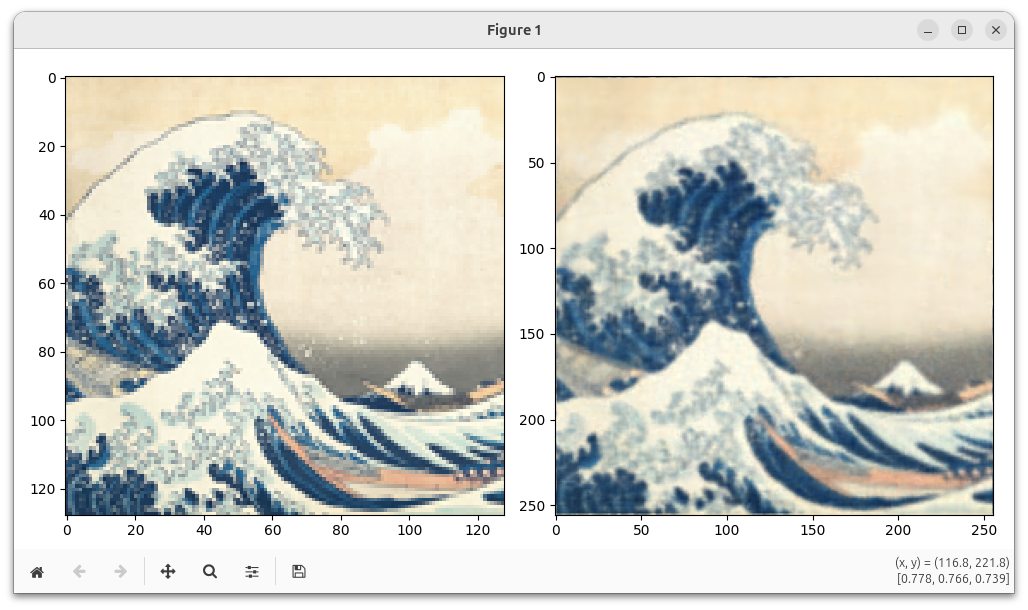
The optimization uses the Adam optimizer (dr.opt.Adam) optimizer and a gradient scaler
(dr.opt.GradScaler) for adaptive
mixed-precision training.
from tqdm.auto import tqdm
import imageio.v3 as iio
import drjit as dr
import drjit.nn as nn
from drjit.opt import Adam, GradScaler
from drjit.auto.ad import Texture2f, TensorXf, TensorXf16, Float16, Float32, Array2f, Array3f

# Load a test image and construct a texture object
ref = TensorXf(iio.imread("https://d38rqfq1h7iukm.cloudfront.net/media/uploads/wjakob/2024/06/wave-128.png") / 256)
tex = Texture2f(ref)

# Establish the network structure. Networks with an encoding
# layer do not need biases, which simplifies the architecture.
net = nn.Sequential(
    nn.TriEncode(16, 0.2),
    nn.Cast(Float16),
    nn.Linear(-1, -1, bias=False),
    nn.LeakyReLU(),
    nn.Linear(-1, -1, bias=False),
    nn.LeakyReLU(),
    nn.Linear(-1, -1, bias=False),
    nn.LeakyReLU(),
    nn.Linear(-1, 3, bias=False),
    nn.Exp()
)

# Instantiate a random number generator to initialize the network weights
rng = dr.rng(seed=0)

# Instantiate the network for a specific backend + input size
net = net.alloc(
    dtype=TensorXf16,
    size=2,
    rng=rng
)

# Convert to training-optimal layout
net = nn.pack(net, layout='training')
print(net)

# The optimizer discovers the parameter via the module's mapping
# interface and keeps its own single-precision copy of the packed buffer.
opt = Adam(lr=1e-3)
opt.update(net)

# This is an adaptive mixed-precision (AMP) optimization, where a half
# precision computation runs within a larger single-precision program.
# Gradient scaling is required to make this numerically well-behaved.
scaler = GradScaler()

res = 256

for i in tqdm(range(40000)):
    # Push the latest optimizer state back into the network (Float32 -> Float16).
    net.update(opt)

    # Generate jittered positions on [0, 1]^2
    t = dr.arange(Float32, res)
    p = (Array2f(dr.meshgrid(t, t)) + rng.random(Array2f, (2, res * res))) / res

    # Evaluate neural net + L2 loss
    img = Array3f(net(nn.CoopVec(p)))
    loss = dr.squared_norm(tex.eval(p) - img)

    # Mixed-precision training: take suitably scaled steps
    dr.backward(scaler.scale(loss))
    scaler.step(opt)

# Done optimizing, now let's plot the result
t = dr.linspace(Float32, 0, 1, res)
p = Array2f(dr.meshgrid(t, t))
img = Array3f(net(nn.CoopVec(p)))

# Convert 'img' with shape 3 x (N*N) into a N x N x 3 tensor
img = dr.reshape(TensorXf(img, flip_axes=True), (res, res, 3))

import matplotlib.pyplot as plt
fig, ax = plt.subplots(1, 2, figsize=(10,5))
ax[0].imshow(ref)
ax[1].imshow(dr.clip(img, 0, 1))
fig.tight_layout()
plt.show()
Hash grid encodings
The above example used a neural network with layer width 64, using the
nn.TriEncode encoding layer to accelerate convergence.
Such small networks are, however, quite limited in their ability to represent
complex signals.
To help with this, Dr.Jit also provides a hash grid encoding
(nn.HashGridEncoding), which was first
introduced in Instant NGP. This
data structure increases the model’s effective parameter count, providing
additional memory to represent complex features while maintaining efficient
network evaluations. The encoding conceptually represents trainable features
on a multi-level grid, but physically stores them in a hash table for memory
efficiency. During evaluation, a hash function maps grid coordinates to table
entries, and the system interpolates features between adjacent grid vertices.
While hash grids work well for low-dimensional inputs, regular grid-based
schemes suffer from exponential scaling: the number of memory lookups grows
exponentially with the number of dimensions. To address this limitation, Dr.Jit
also supports permutohedral encodings (nn.PermutoEncoding), introduced in the PermutoSDF paper. These encodings use
triangles, tetrahedrons and their higher dimensional equivalents, requiring
only a linear number of memory lookups with respect to dimension. This makes
them particularly effective for high-dimensional inputs where regular grids
become prohibitively expensive.
All previous uses of cooperative vectors and neural network modules in this
documentation rely on the nn.pack() function to assemble
coefficients into an efficient memory layout. However, hash grid weights
cannot participate in this packing process since they use a different memory
layout and potentially incompatible type representations. To incorporate a hash
grid into a nn.Module, we must use an indirection via
nn.HashEncodingLayer, which wraps the hash grid
while keeping its parameters separate. These parameters must then be optimized
independently, as shown in the following example that learns the same image
using a hash grid encoding.
from tqdm.auto import tqdm
import imageio.v3 as iio
import drjit as dr
import drjit.nn as nn
from drjit.opt import Adam, GradScaler
from drjit.auto.ad import Texture2f, TensorXf, TensorXf16, Float16, Float32, Array2f, Array3f

# Load a test image and construct a texture object
ref = TensorXf(iio.imread("https://d38rqfq1h7iukm.cloudfront.net/media/uploads/wjakob/2024/06/wave-128.png") / 256)
tex = Texture2f(ref)

# Instantiate a random number generator to initialize the network weights
rng = dr.rng(seed=0)

# Create a two dimensional hash grid encoding, with 8 levels, 2 features per
# level and a scaling factor between levels of 1.5.
enc = nn.HashGridEncoding(
    Float16,
    2,
    n_levels=8,
    n_features_per_level=2,
    per_level_scale=1.5,
    rng=rng,
)

# Alternatively we can also use a permutohedral encoding. In contrast to a hash
# grid, it uses triangles, tetrahedrons and their higher dimensional
# equivalences as simplexes. Their vertex count scales linearly with dimension,
# allowing for higher dimensional inputs, while keeping the memory lookup
# overhead minimal.
# Uncomment the following lines to enable the permutohedral encoding.
# enc = nn.PermutoEncoding(
#     Float16,
#     2,
#     n_levels=8,
#     n_features_per_level=2,
#     per_level_scale=1.5,
# )
print(enc)


# Establish the network structure.
# In contrast to the previous example, we use a HashEncodingLayer, referencing
# the previously created hash grid. Its parameters will not be part of the
# packed weights, and have to be handled separately. The ``prefix`` keeps
# the packed weights from colliding with the hash grid parameters when both
# are handed to a single optimizer.
net = nn.Sequential(
    nn.HashEncodingLayer(enc),
    nn.Cast(Float16),
    nn.Linear(-1, -1, bias=False),
    nn.LeakyReLU(),
    nn.Linear(-1, -1, bias=False),
    nn.LeakyReLU(),
    nn.Linear(-1, -1, bias=False),
    nn.LeakyReLU(),
    nn.Linear(-1, 3, bias=False),
    nn.Exp(),
    prefix='mlp'
)

# Instantiate the network for a specific backend + input size.
net = net.alloc(TensorXf16, 2, rng=rng)

# Convert to training-optimal layout.
net = nn.pack(net, layout='training')
print(net)

# Optimize a single-precision copy of the parameters. The optimizer picks
# up ``mlp.weights`` from ``net`` through the mapping interface and we
# add the encoding parameters alongside.
opt = Adam(lr=1e-3)
opt.update(net)
opt['enc.params'] = Float32(enc.params)

# This is an adaptive mixed-precision (AMP) optimization, where a half
# precision computation runs within a larger single-precision program.
# Gradient scaling is required to make this numerically well-behaved.
scaler = GradScaler()

res = 256

for i in tqdm(range(40000)):
    # Push the latest network weights back into the net (Float32 -> Float16).
    net.update(opt)
    # The encoding parameters still have to be written back manually.
    enc.params[:] = Float16(opt['enc.params'])

    # Generate jittered positions on [0, 1]^2
    t = dr.arange(Float32, res)
    p = (Array2f(dr.meshgrid(t, t)) + rng.random(Array2f, (2, res * res))) / res

    # Evaluate neural net + L2 loss
    img = Array3f(net(nn.CoopVec(p)))
    loss = dr.squared_norm(tex.eval(p) - img)

    # Mixed-precision training: take suitably scaled steps
    dr.backward(scaler.scale(loss))
    scaler.step(opt)

# Done optimizing, now let's plot the result
t = dr.linspace(Float32, 0, 1, res)
p = Array2f(dr.meshgrid(t, t))
img = Array3f(net(nn.CoopVec(p)))

# Convert 'img' with shape 3 x (N*N) into a N x N x 3 tensor
img = dr.reshape(TensorXf(img, flip_axes=True), (res, res, 3))

import matplotlib.pyplot as plt
fig, ax = plt.subplots(1, 2, figsize=(10,5))
ax[0].imshow(ref)
ax[1].imshow(dr.clip(img, 0, 1))
fig.tight_layout()
plt.show()