Evaluation
The previous sections explained how Dr.Jit traces computation for later evaluation. We now examine what situations trigger this evaluation step, potential performance pitfalls, and how to take manual control if needed.
Why is it needed?
Certain operations simply cannot be traced. When Dr.Jit encounters them in a program, they force the system to compile and run a kernel before continuing.
The following operations all exhibit this behavior:
Printing the contents of arrays: printing requires knowing the actual array contents at that moment, hence evaluation can no longer be postponed. Here is an example:
a = Float(1, 2) + 3 # <-- traced
print(a)            # <-- evaluated
(Dr.Jit offers an alternative
drjit.print()statement that can print in a delayed fashion to be compatible with tracing.)Accessing arrays along their trailing dimension: recall that the trailing dimension of Jit-compiled arrays plays a special role, as the system uses it to parallelize the computation. Accessing specific entries or gathering along this dimension creates a data dependency that cannot be satisfied within the same parallel phase. An example:
a = Float(1, 2) + 3 # <-- traced

b = a[0]            # <-- evaluated

# Also generally evaluated:
b = dr.gather(Float, source=a, index=UInt32(0))
Dr.Jit will split such programs into multiple kernels, which it does eagerly by evaluating the source array whenever it detects this type of access.
Note that it is specifically the trailing dimension that causes this behavior. Accesses to components of a nested array type like
drjit.cuda.Array3fare unproblematic and can be traced.a = Array3f(1, 2, 3) + 4 # <-- traced b = a[0] + a.y # <-- traced
Side effects: operations such as
drjit.scatter(),drjit.scatter_reduce(), etc., modify existing arrays. While such operations are traced (i.e. postponed for later evaluation), subsequent access of the modified array triggers a variable evaluation. An example:a = dr.empty(Float, 3) dr.scatter(target=a, value=Float(0, 1, 2), index=UInt32(2, 1, 0)) # <-- traced b = a + 1 # <-- evaluates 'a' and traces the addition
Here, evaluation enforces an ordering constraint that is in general needed to ensure correctness in a parallel execution context.
Reductions: when using an operation such as
dr.sum()ordr.all()to reduce along the trailing dimension of an array, a prior evaluation is required. Some reductions accept an optionalmode="symbolic"parameter to postpone evaluation.Data exchange: casting Dr.Jit variables into nd-arrays of other frameworks (e.g. NumPy, PyTorch, etc.) requires their evaluation, as other libraries don’t have a compatible concept of traced computation.
Manual: variable evaluation can also be triggered manually using the operation
drjit.eval():dr.eval(a)
How does it work?
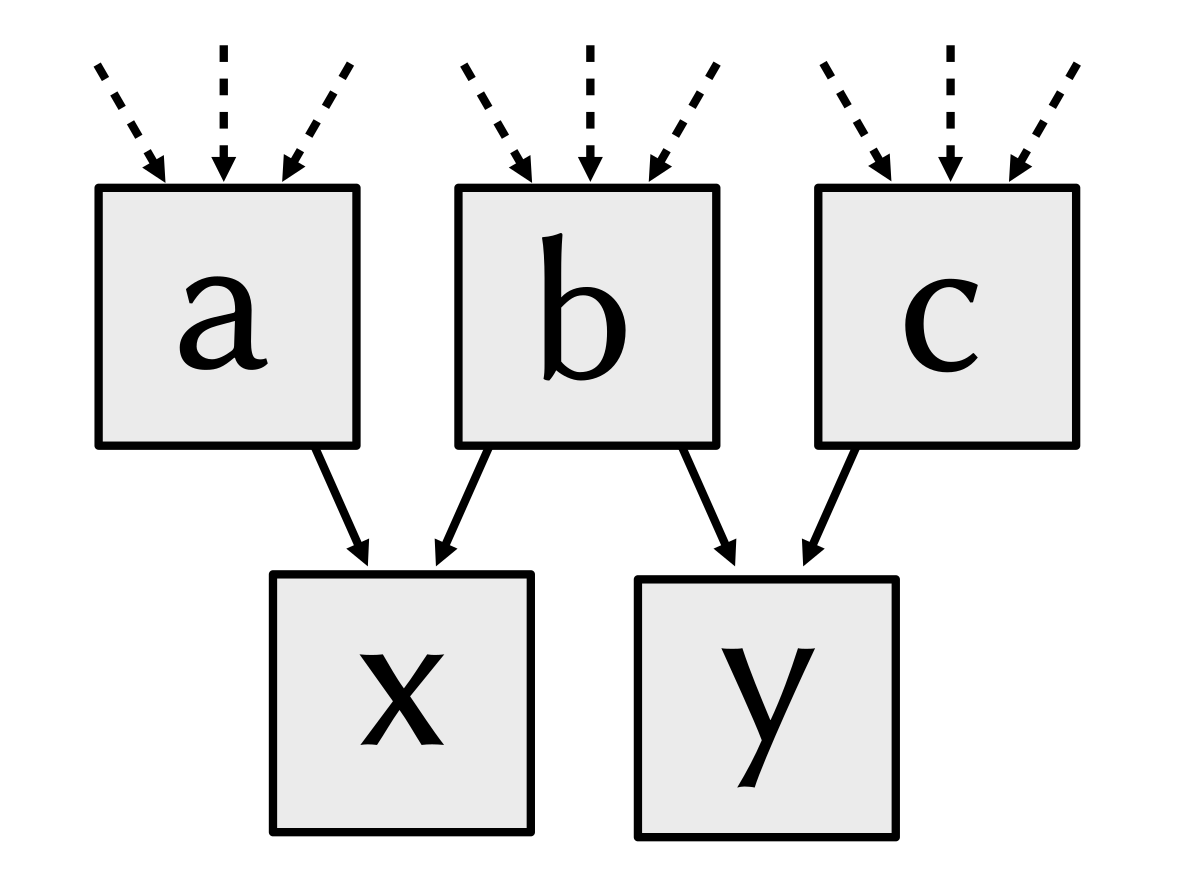
Suppose that a traced computation has the following dependence structure.
If we now evaluate x via
dr.eval(x)
this generates a kernel that also computes the dependent variables a and
b. Running this kernel turns x from an implicit representation (a
computation graph node) into an explicit one (a memory region stored on the
CPU/GPU).
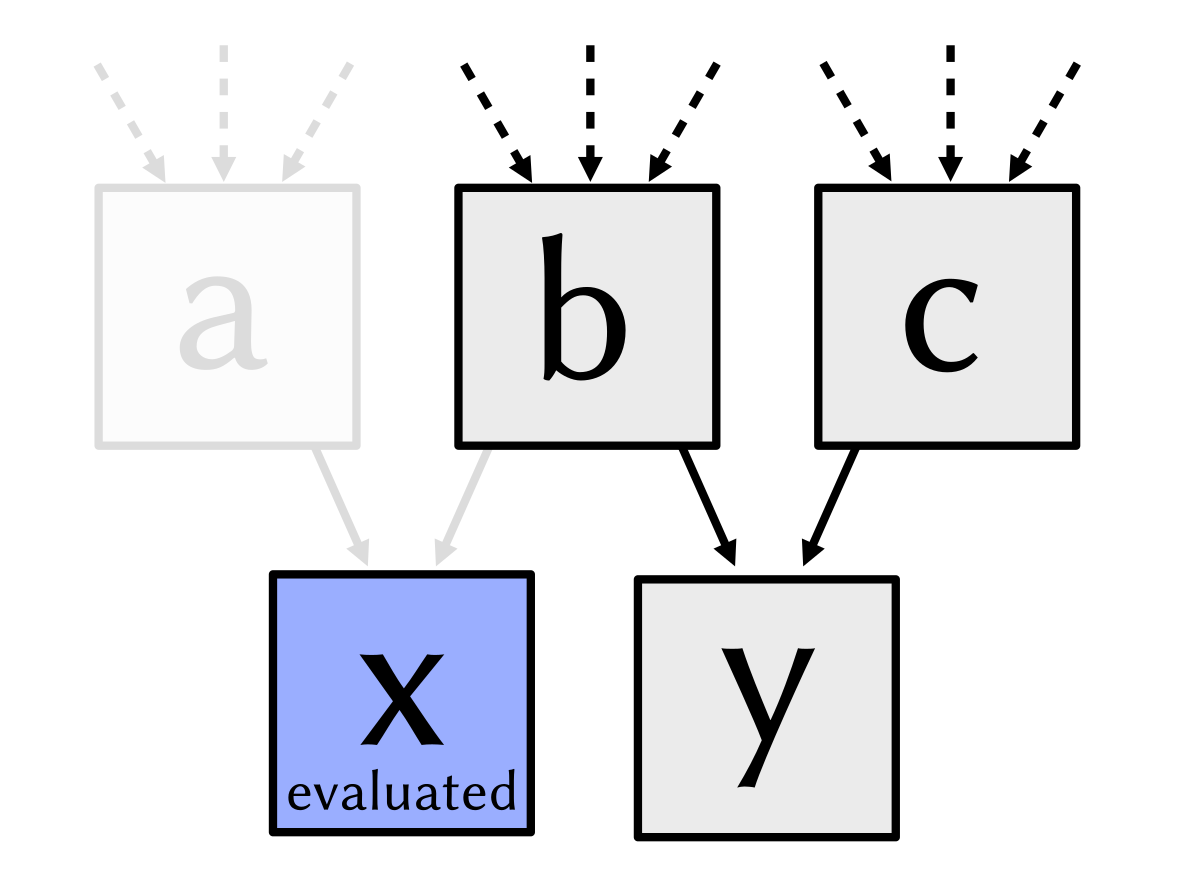
This evaluated x no longer needs its dependencies—any parts of the
computation graph that become unreferenced as a consequence of this are
automatically removed.
Suppose that we now evaluate y:
dr.eval(y)
This will compile another kernel that includes the step b a second
time. If this redundant computation is costly, we could instead also have
explicitly evaluated both x and y as part of the same kernel.
dr.eval(x, y)
Unevaluated arrays specify how something can be computed without consuming any device memory. In contrast, a large evaluated array can easily take up gigabytes of device memory. Because of this, some care is often advisable to avoid superfluous variable evaluation.
Once evaluated, variables behave exactly the same way in subsequent
computations except that any use in kernels causes them to be loaded instead
of recomputed. Passing an already evaluated array to dr.eval() a second time is a no-op.
Asynchronous execution
Dr.Jit is asynchronous in two different ways:
operations are traced for later evaluation as previously explained.
evaluation itself also takes place asynchronously.
For example, a statement like
dr.eval(x)
appends a work item to a GPU/CPU command queue and returns right away instead of waiting for this evaluation to complete. This way, we can immediately begin tracing the next block of code, which improves performance by keeping both host and target device busy. A more accurate version of the previous flow diagram therefore looks as follows:
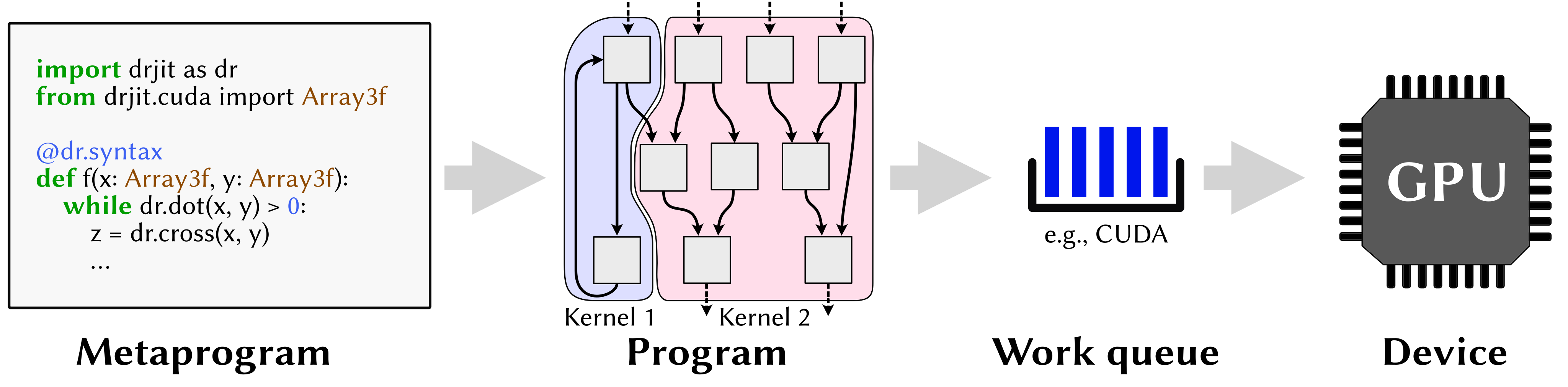
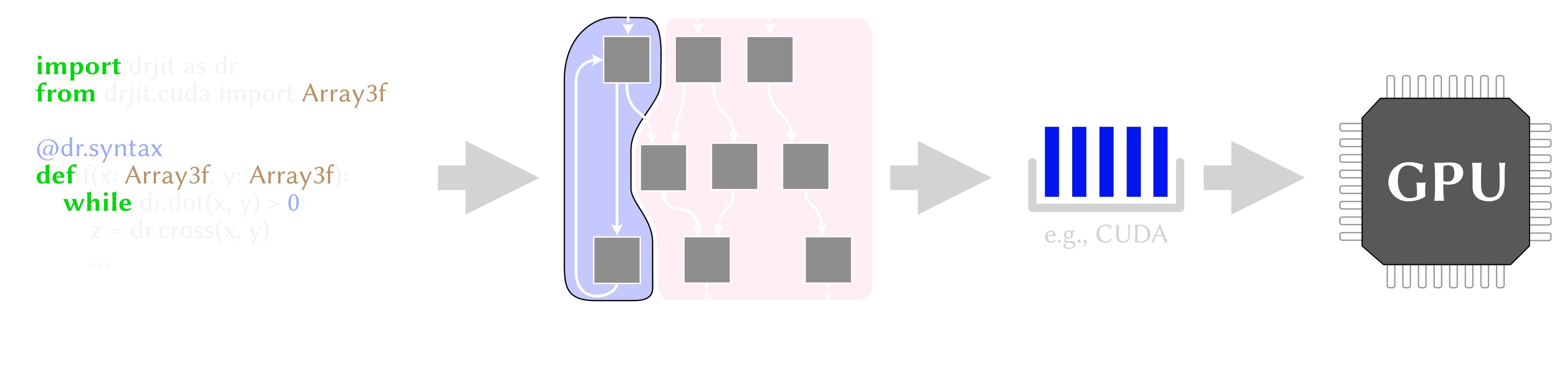
This behavior is transparent, which means that no special steps need to be taken on the user’s side (e.g., to wait for computation to finish or to synchronize with the queue—Dr.Jit will do so automatically if needed).
Kernel caching
When Dr.Jit evaluates an expression, it must generate and compile a kernel, i.e., a self-contained parallel program that can run on the target device. This compilation step is not free—in fact, compilation can sometimes take longer than the actual runtime of an associated kernel.
To mitigate this cost, Dr.Jit implements a kernel cache. Roughly speaking, the idea is that we often end up repeating the same kind of computation with different data. Whenever the system detects that it already has a suitable kernel at hand, it reuses this kernel instead of compiling it again (this is called a cache hit).
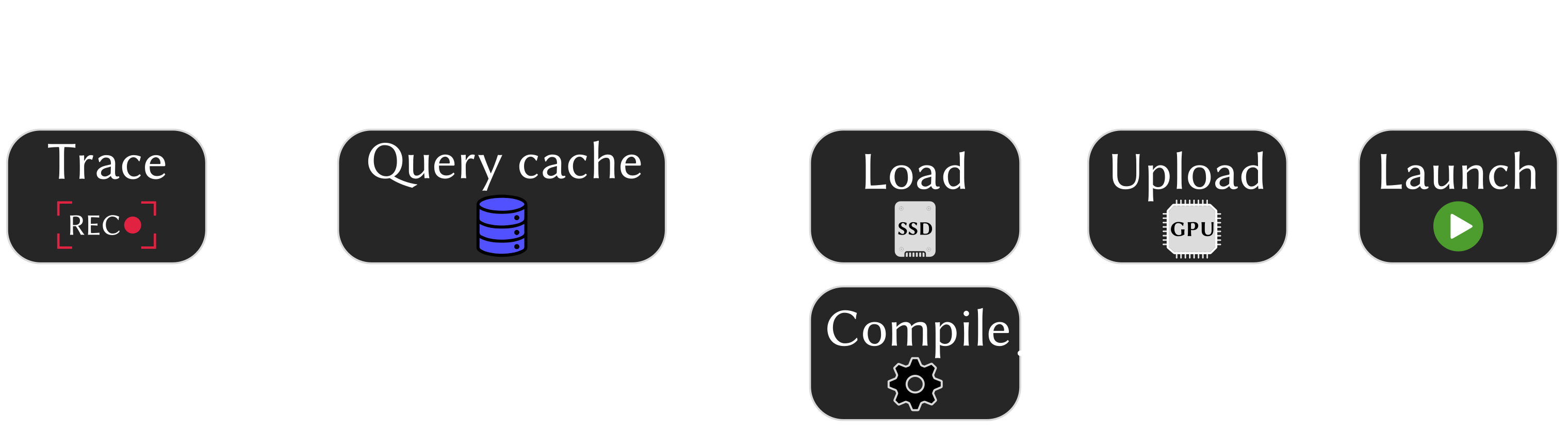
Cache misses fall into two categories: a soft miss means that we already encountered this kernel in a previous session, and a compiled version can be loaded from disk. A hard miss means that this computation was never seen before and requires a costly compilation step is needed. The following flow diagram visualizes the role of the cache:
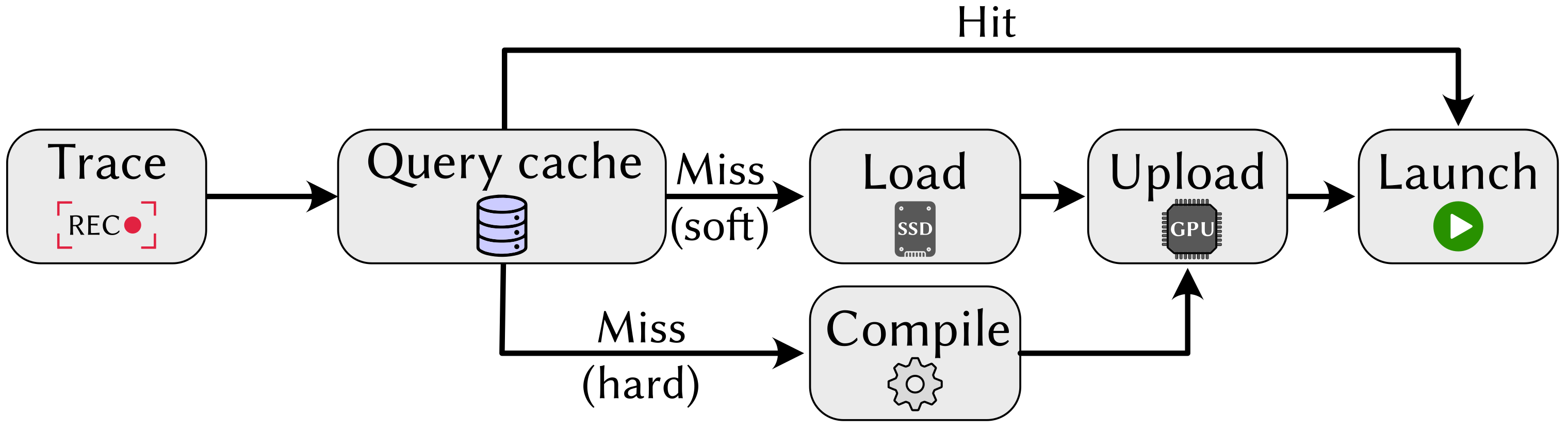
In a gradient-based optimization, typically only the first gradient step will compile kernels (causing either soft or hard misses), which are subsequently reused many times.
The location of the on-disk cache depends on the backend, operating system, and
type of kernel. It can be found in the following location (where ~ refers
to the user’s home directory):
LLVM Backend:
Linux and macOS:
~/.drjit/*.llvm.binWindows:
~\AppData\Local\Temp\drjit\*.llvm.bin
CUDA Backend:
The CUDA environment already provides an on-disk kernel caching mechanism, which is reused by Dr.Jit. The cache files can be found here:
Linux:
~/.nv/ComputeCache\*Windows:
~\AppData\Roaming\NVIDIA\ComputeCache\*
Kernels that perform hardware-accelerated ray tracing go through a different compilation pipeline named OptiX. In this case, they are cached in a single file at the following location:
Linux:
~/.drjit/optix7cache.dbWindows:
~\AppData\Local\Temp\drjit\optix7cache.db
Analyzing JIT behavior
Tracing and evaluation run silently behind the scenes, but sometimes it can be
useful to watch this process as it occurs. For this, call
dr.set_log_level() to set the log level to a value
of Info or lower (the default is
Warn).
>>> import drjit as dr
>>> from drjit.auto import Float

>>> x = dr.arange(Float, 1024)
>>> y = x + 1
>>> dr.set_log_level(dr.LogLevel.Info)
>>> y
jit_eval(): launching 1 kernel.
  -> launching c77f588e6b5e7e2f (n=1024, in=0, out=1, ops=8, jit=33.12 us):
     cache miss, build: 4.1462 ms.
jit_eval(): done.
[1, 2, 3, .. 1018 skipped .., 1022, 1023, 1024]
With this increased level, every kernel launch now triggers an explicit log
message. Here, it shows that this computation was encountered for the first
time (cache miss), requiring a backend compilation step that took much
longer than the time spent within Dr.Jit (~4 ms vs ~33 μs). This compilation
step is, however, only needed once.
Other statistics shown here are the kernel ID (hexadecimal number), number of
elements processed in parallel (n=1024), number of input (in=0) and
output (out=1) arrays and IR operations (ops=8), which is a simple
proxy for the complexity of a generated kernel.
The function dr.whos() lists all currently registered
JIT variables along with statistics about compilation and memory allocation. It
is also possible to assign labels to specific variables to identify them in
this list.
>>> x.label = "x"
>>> y.label = "y"
>>> dr.whos()

  ID       Type       Status     Refs       Size      Storage   Label
  ========================================================================
  1        cuda u32                 1       1024
  2        cuda f32                 1       1024
  4        cuda f32   device 0      1       1024        4 KiB
  ========================================================================

  JIT compiler
  ============
   - Storage           : 4 KiB on device, 12 KiB unevaluated.
   - Variables created : 5 (peak: 6, table size: 832 B).
   - Kernel launches   : 1 (0 cache hits, 0 soft, 1 hard misses).

  Memory allocator
  ================
   - host              : 0 B/0 B used (peak: 0 B).
   - host-async        : 0 B/0 B used (peak: 0 B).
   - host-pinned       : 0 B/0 B used (peak: 0 B).
   - device            : 4 KiB/4 KiB used (peak: 4 KiB).
It shows that three variables are registered with the system, of which one
(index 4, label y) is evaluated and occupies 4 KiB of device memory on CUDA
device 0.
The message also shows the total number of kernel launches and corresponding hits or soft/hard misses. The launch statistics in particular can be helpful to investigate performance pitfalls (please see the next section for details).
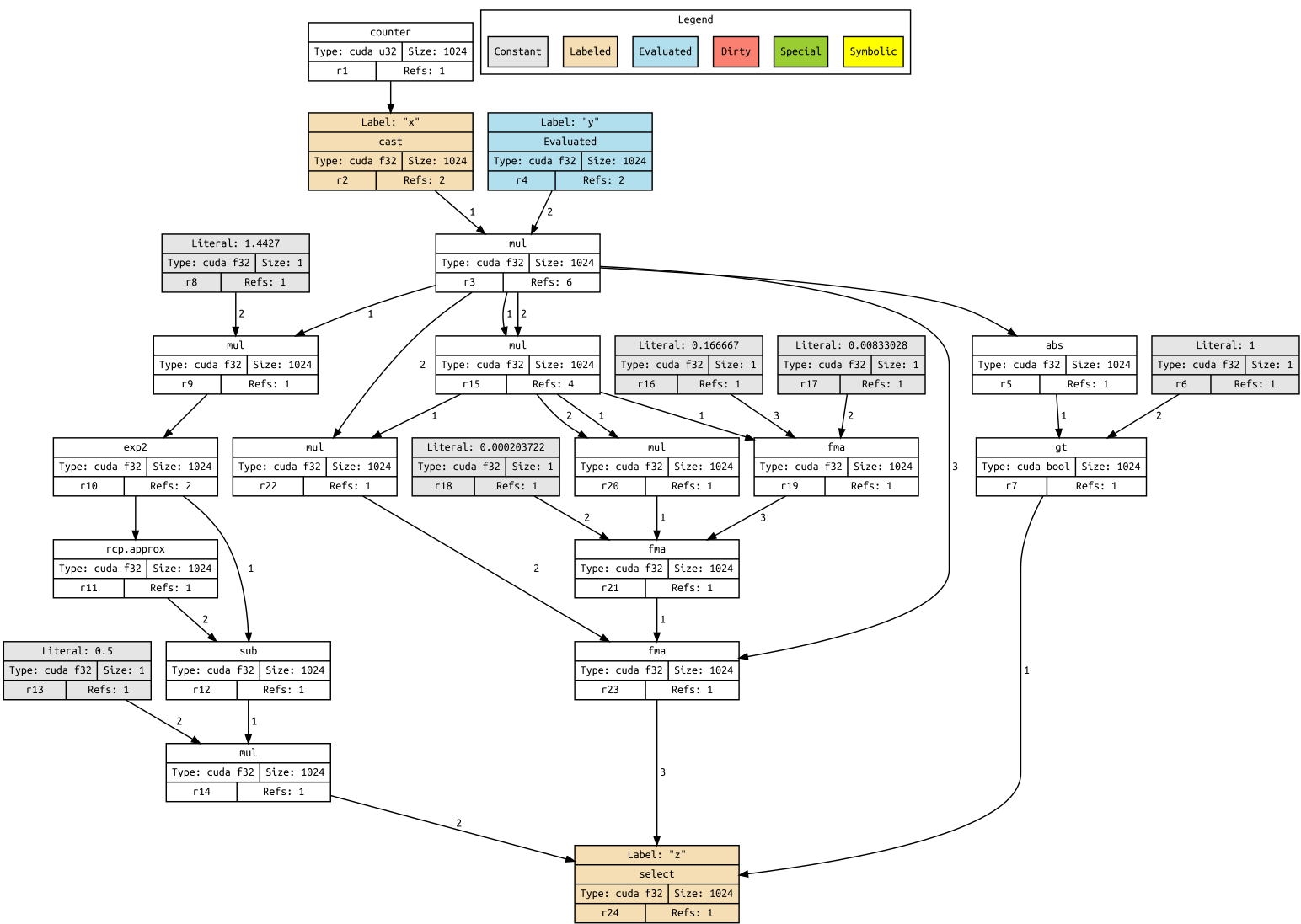
Finally, it is possible to visualize the complete graph of traced computation
via dr.graphviz() (this requires installing the
graphviz PyPI package).
Let’s include one more operation to make this a bit more interesting:
>>> z = dr.sinh(x*y)
>>> z.label = "z"
>>> dr.graphviz()  # <-- Alternatively, dr.graphviz().view() opens a separate window
This produces a graph combining the previous expression with the implementation
of dr.sinh().
Pitfalls
Please aware of the following cases that can lead to poor performance.
Caching
Dr.Jit treats literal constants (i.e., known scalars such as 1.234) as
code rather than data. This is generally a good thing, but it also means that
kernels that are identical except for such a literal constant do not benefit
from the kernel cache, as they are considered to be distinct.
This can turn into a rather severe performance bottleneck when launching kernels from a loop. Consider the following example:
y = Float(....)
for i in range(1000):
    y = f(y, i)
    dr.eval(y)
    # ...
If f() depends on i, this code will likely compile 1000 separate
kernels that are identical except for the number 0, 1, 2, …, that is baked
into the traced code of f(). Such repeated kernel compilation steps often
end up dominating the computation time and lead to poor device utilization.
Here, it would have been better to compile a single kernel that can handle
any possible value of i.
To do so, use the function dr.opaque(), which creates
an evaluated variable containing the given constant. With this change, the
counter is no longer a literal constant, which collapses all loop iterations to
a single consistent cache entry.
for i in range(1000):
    i2 = dr.opaque(Int, i)
    y = f(y, i2)
    dr.eval(y)
Alternatively, the following also works
i = dr.opaque(Int, 0)
for _ in range(1000):
    y = f(y, i)
    i += 1
    dr.eval(y, i)
To track down such issues, use the function drjit.whos() (and
possibly, increase the log level as explained above). If you notice that every
iteration of a loop generates soft or hard cache misses, the issue is
potentially due to a changing literal constant.
Caching, continued
Another pattern that can break kernel caching are growing dependency chains.
Consider a function f that fetches numbers from a random number generator
(in this case, using the builtin PCG32
pseudorandom number generator provided by Dr.Jit – however, note that the
issue explained here is not specific to random number generation).
A loop calls this function 1000 times in a row and accumulates the results:
from drjit.auto import PCG32

rng = PCG32(100000)
y = Float(0)

for _ in range(1000):
    y += f(rng)
    dr.eval(y)
Benchmarking a program of the above form will likely reveal that kernels launched the loop become progressively slower. Furthermore, kernel caching doesn’t work, and 1000 separate costly compilation steps are needed. What is going on?!
The problem is that the random number generator has an internal state variable
rng.state that evolves whenever the
function f fetches a new sample (e.g., using rng.next_float32()). If we never explicitly evaluate the random
number generator, then these updates remain in computation graph form.
Consequently, each iteration of the loop will repeat all (up to 1000) steps to
re-play the rng state up to the current iteration, which breaks caching and
causes the progressive slowdown. The fix is easy:
dr.eval(x, rng)
we must simply remember to also evaluate the rng variable.
Element-wise access
Element-wise access along the trailing (vectorized) dimension of Dr.Jit arrays is best avoided. For example, the following is inefficient:
x: Float = f(...) # Some function, which produces a large output array
for i in range(len(x)):
    if x[i] < 0:
        raise Exception('Negative element found!')
If x is a 1-million entry drjit.cuda.Float array, the loop
will generate 1 million separate PCI-Express transactions that each copy a
tiny 4-byte value to the CPU. This is on top of the general inefficiency of
iterating over many values in an interpreted programming language.
Instead, prefer vectorized constructions:
if dr.any(x < 0):
    raise Exception('Negative element found!')
If you absolutely must iterate over scalar elements, it’s better to use
a host-centric array framework, e.g., by calling x.numpy() to convert x into a NumPy array.